

Data
This shows an example with just 4 series of the M4 dataset. If you want to run it yourself on all of them, you can refer to this notebook.
We now split this data into train and validation.
source
MLForecast
Forecasting pipeline
The MLForecast object encapsulates the feature engineering + training
the models + forecasting
source
MLForecast.fit
Apply the feature engineering and train the models.
source
MLForecast.save
Save forecast object
source
MLForecast.load
Load forecast object
source
MLForecast.update
Update the values of the stored series.
source
MLForecast.make_future_dataframe
Create a dataframe with all ids and future times in the forecasting horizon.
source
MLForecast.get_missing_future
Get the missing id and time combinations in
X_df.
source
MLForecast.forecast_fitted_values
Access in-sample predictions.
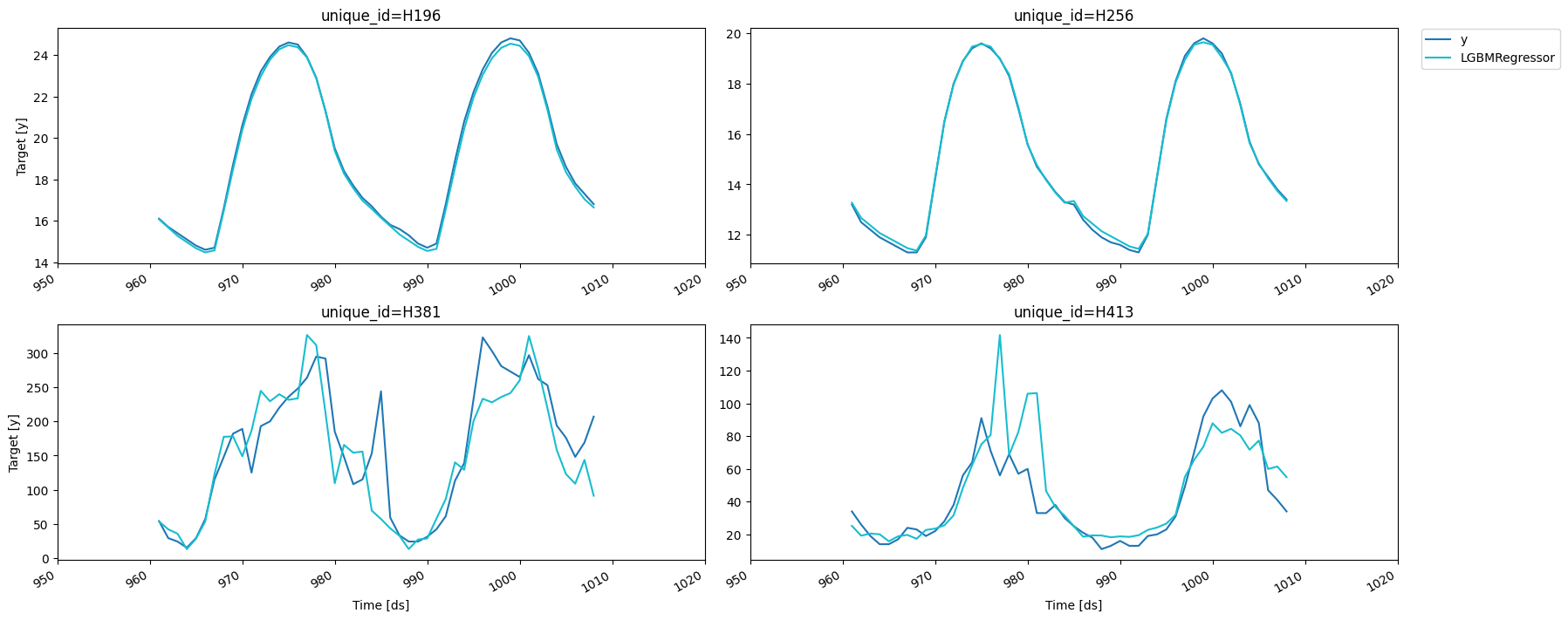
Once we’ve run this we’re ready to compute our predictions.
source
MLForecast.predict
Compute the predictions for the next
h steps.
Prediction intervals
WithMLForecast,
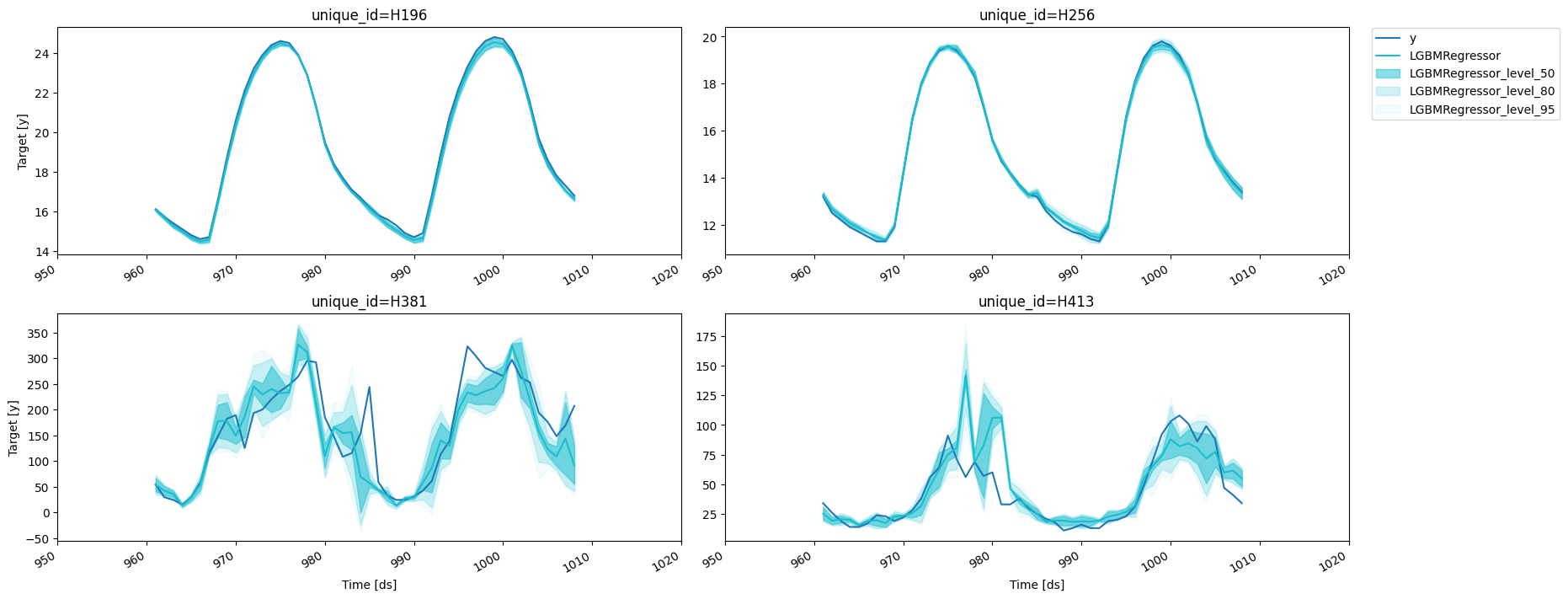
you can generate prediction intervals using Conformal Prediction. To
configure Conformal Prediction, you need to pass an instance of the
PredictionIntervals
class to the prediction_intervals argument of the fit method. The
class takes three parameters: n_windows, h and method.
n_windowsrepresents the number of cross-validation windows used to calibrate the intervalshis the forecast horizonmethodcan beconformal_distributionorconformal_error;conformal_distribution(default) creates forecasts paths based on the cross-validation errors and calculate quantiles using those paths, on the other handconformal_errorcalculates the error quantiles to produce prediction intervals. The strategy will adjust the intervals for each horizon step, resulting in different widths for each step. Please note that a minimum of 2 cross-validation windows must be used.
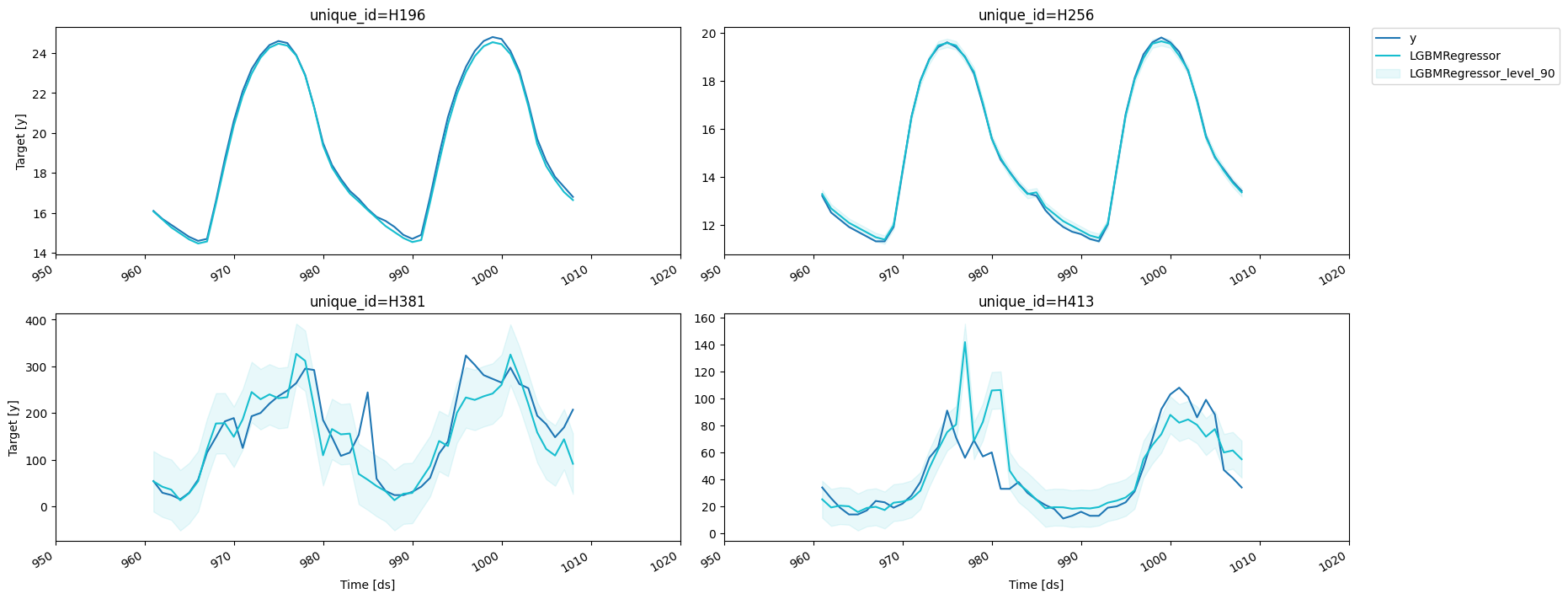
predict method using the level argument. Levels must lie between
0 and 100.
Let’s explore the generated intervals.
h=1 to the
PredictionIntervals
class. The caveat of this strategy is that in some cases, variance of
the absolute residuals maybe be small (even zero), so the intervals may
be too narrow.
Forecast using a pretrained model
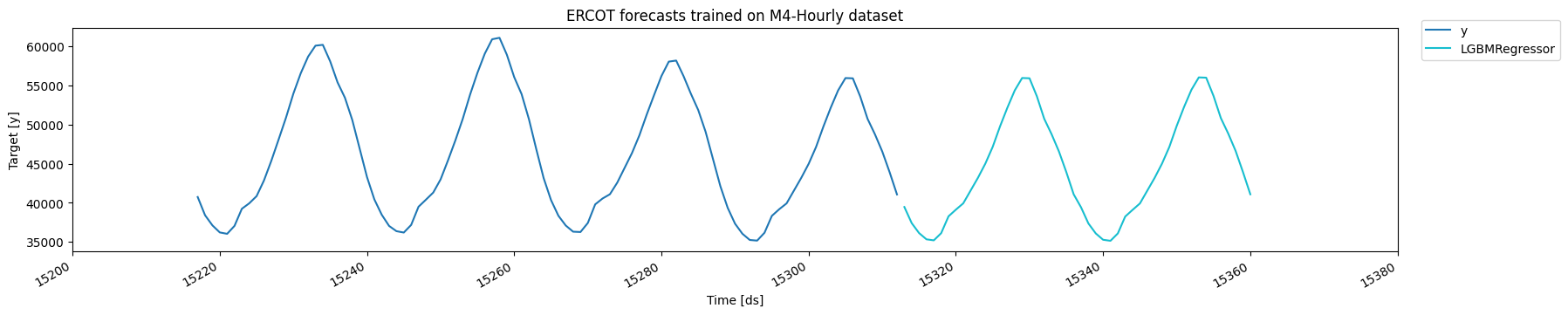
MLForecast allows you to use a pretrained model to generate forecasts for a new dataset. Simply provide a pandas dataframe containing the new observations as the value for thenew_df argument when calling the
predict method. The dataframe should have the same structure as the
one used to fit the model, including any features and time series data.
The function will then use the pretrained model to generate forecasts
for the new observations. This allows you to easily apply a pretrained
model to a new dataset and generate forecasts without the need to
retrain the model.
Forecast.preprocess.
source
MLForecast.preprocess
Add the features to
data.
If we do this we then have to call
Forecast.fit_models, since this
only stores the series information.
source
MLForecast.fit_models
Manually train models. Use this if you called
MLForecast.preprocess
beforehand.
source
MLForecast.cross_validation
Perform time series cross validation. Creates
n_windows splits where
each window has h test periods, trains the models, computes the
predictions and merges the actuals.
If we would like to know how good our forecast will be for a specific
model and set of features then we can perform cross validation. What
cross validation does is take our data and split it in two parts, where
the first part is used for training and the second one for validation.
Since the data is time dependant we usually take the last x
observations from our data as the validation set.
This process is implemented in
MLForecast.cross_validation,
which takes our data and performs the process described above for
n_windows times where each window has h validation samples in it.
For example, if we have 100 samples and we want to perform 2 backtests
each of size 14, the splits will be as follows:
- Train: 1 to 72. Validation: 73 to 86.
- Train: 1 to 86. Validation: 87 to 100.
step_size argument. For example, if we have 100 samples and we want to
perform 2 backtests each of size 14 and move one step ahead in each fold
(step_size=1), the splits will be as follows:
- Train: 1 to 85. Validation: 86 to 99.
- Train: 1 to 86. Validation: 87 to 100.
refit=False. This allows you to evaluate the
performance of your models using multiple window sizes without having to
retrain them each time.
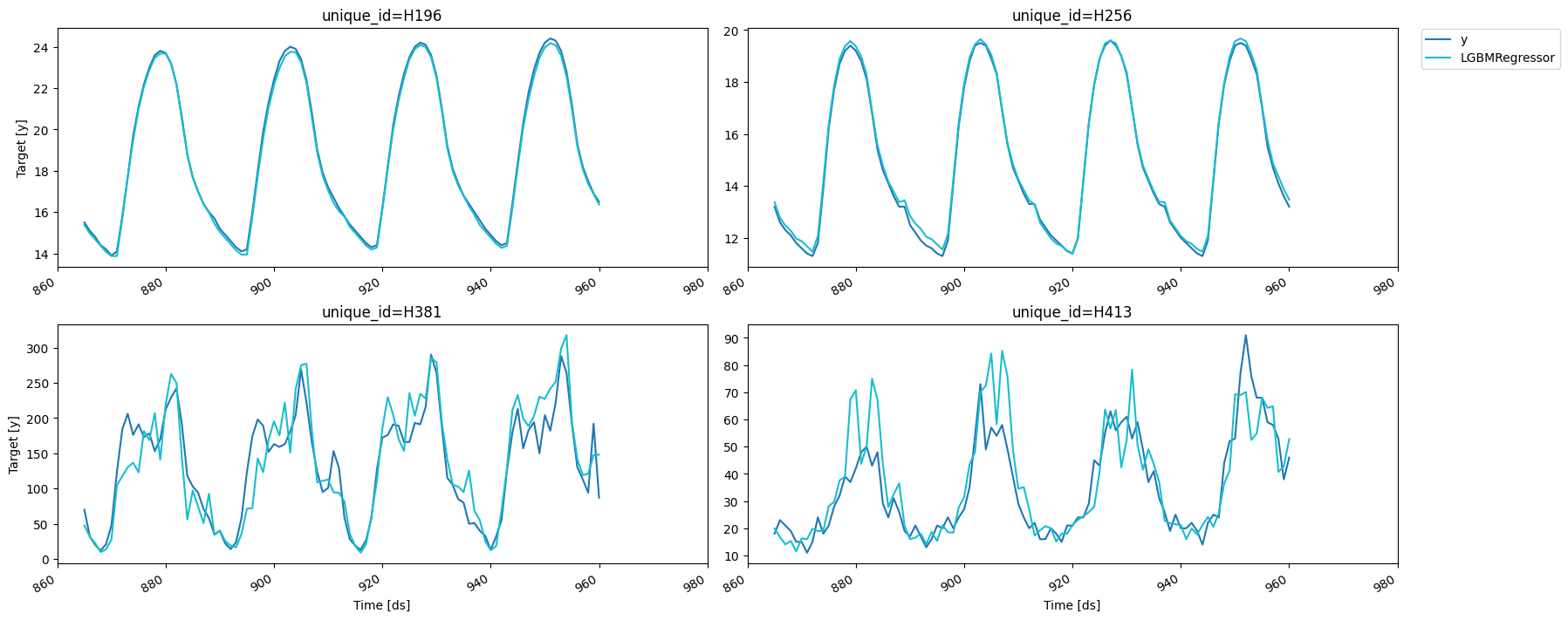
Since we set
fitted=True we can access the predictions for the
training sets as well with the cross_validation_fitted_values method.
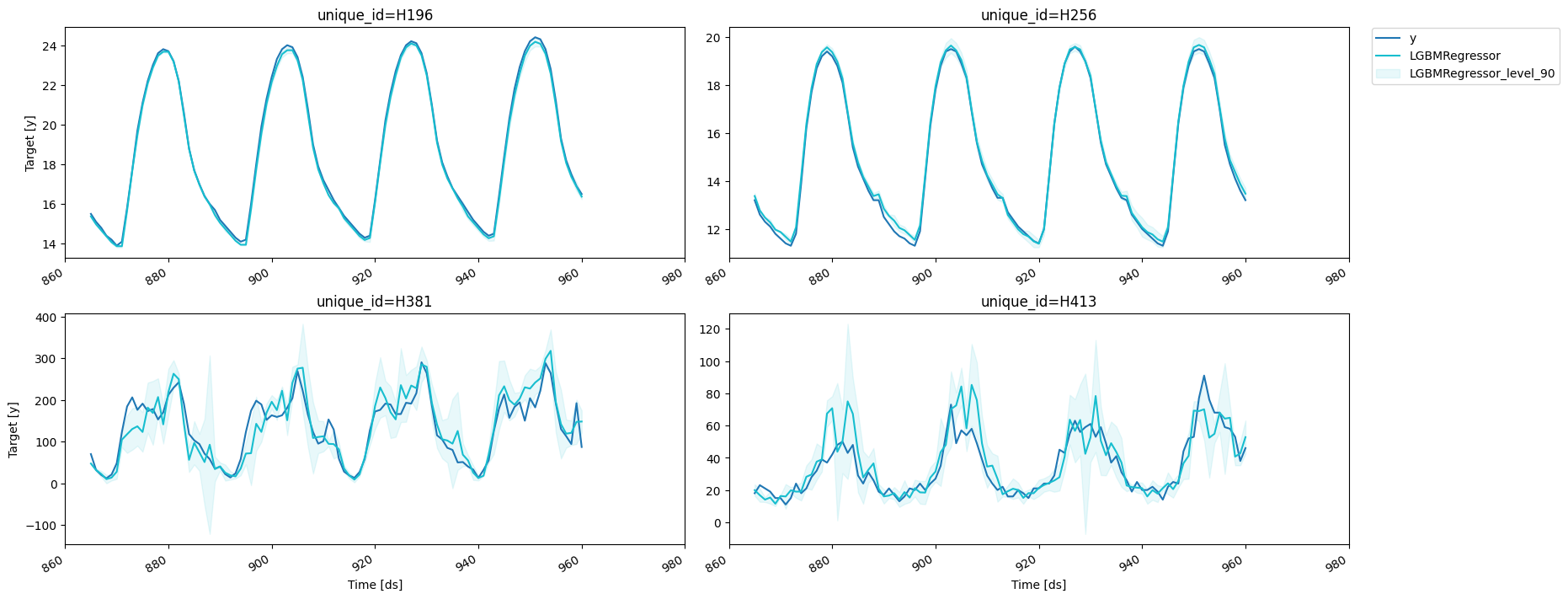
We can also compute prediction intervals by passing a configuration to
prediction_intervals as well as values for the width through levels.
The
refit argument allows us to control if we want to retrain the
models in every window. It can either be:
- A boolean: True will retrain on every window and False only on the first one.
- A positive integer: The models will be trained on the first window
and then every
refitwindows.
source
MLForecast.from_cv
Once you’ve found a set of features and parameters that work for your problem you can build a forecast object from it using
MLForecast.from_cv,
which takes the trained
LightGBMCV
object and builds an
MLForecast
object that will use the same features and parameters. Then you can call
fit and predict as you normally would.